Best Chore Apps for Kids 2026: 7 Apps Compared Honestly
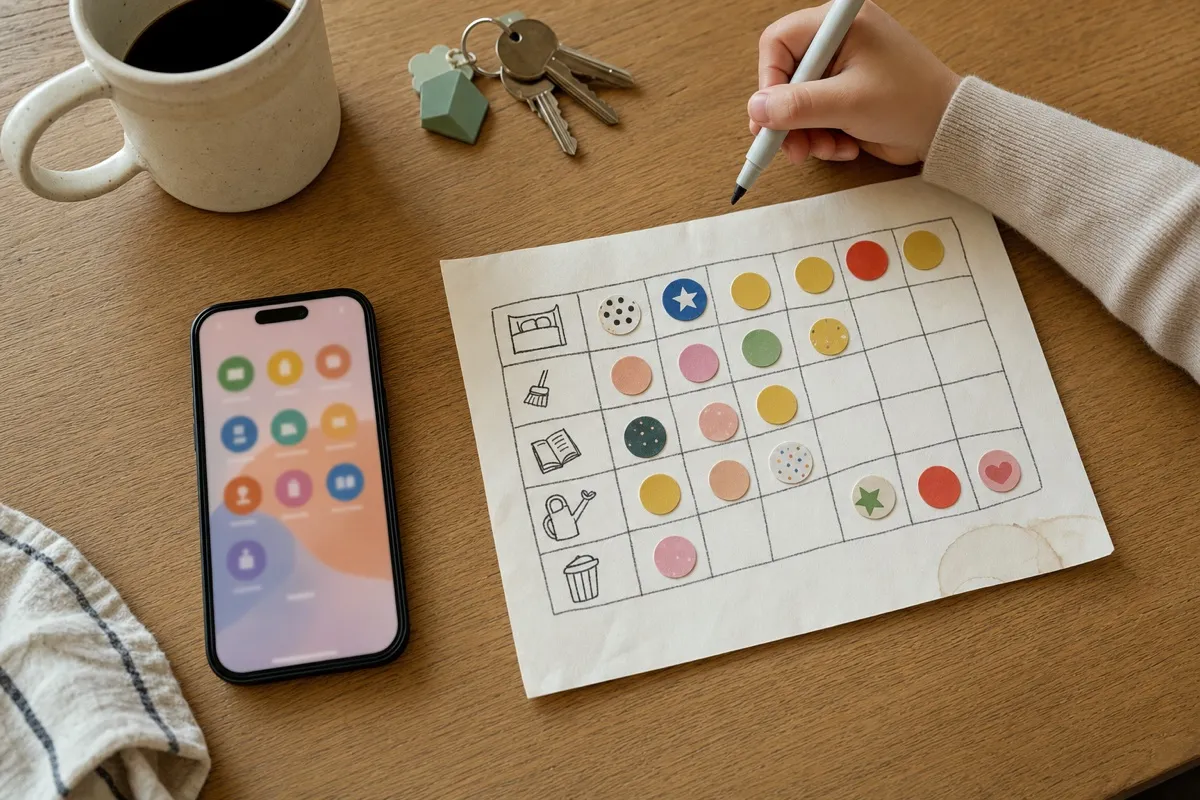
The paper chart curled up weeks ago, and asking for the same chores every morning wears everyone out. If you want one weekly chart the whole family shares, parents included, that is free for up to 3 people and prints for the fridge, start with Family Checklist.
Full disclosure: Family Checklist is our app, and it has no App Store ratings yet (October 12, 2026). Judge it by the screenshots and the table, not by stars.
The short answer: best chore apps for kids, by family
- Family Checklist: one weekly chart for the whole family, parents included. Free with no time limit for 3 people × 3 tasks, and this week's chart prints free.
- Joon: for a child of 6 to 12 who will only do tasks for a game. From $89.99 a year.
- Chorsee: for households that want rotation, photo proof and allowance tracking. Free up to 10 chores.
- Neat Kid: for one child who likes stars and rewards. Free for the first child.
- Habitica: for a teen who likes role-playing games. Fully free.
- MyChoreBoard and S'moresUp: a free web-and-phone board, and a paid family organizer with a 45-day free window.
Prices: US App Store, October 12, 2026.
How We Compared the Best Chore Apps for Kids
We looked at seven apps that do the same job: chores, routines and habits for kids. We kept to apps that do what a chore chart does. That rules out money apps such as Greenlight, BusyKid, FamZoo, Acorns Early, Rooster Money and Homey. They are built around paying kids, which is a different job. It also rules out Cozi, which is a family calendar with lists, and routine timers such as Happy Kids Timer. Both get a short note further down.
If you read the older version of this page: the original OurHome app no longer shows up on the US App Store. A search there returns only an app by another developer with a similar name, so we dropped it.
The screenshots are real screens from one Android emulator, taken in early October 2026. We used the same pretend family in every app: a parent, Alex, and two kids, Emma and Leo. Ratings and prices come from the US App Store and Google Play, pulled on October 12, 2026. We did not install Habitica, S'moresUp or MyChoreBoard. Their facts come from their store pages and websites.
Chore App Comparison Table
Every cell below comes from the store listings, the vendors' sites or our screenshots, as of October 12, 2026. Family Checklist comes first because it is ours; read the other columns just as closely.
Swipe the table sideways →
| Oct 2026 | Family Checklist | Joon | Chorsee | Neat Kid | Habitica | MyChoreBoard |
|---|---|---|---|---|---|---|
| Free for good | 3 members × 3 tasks, no time limit | Free version, features limited | 10 chores | First child | Full app | Free, cap not stated |
| Sign-up | None | Account needed | Guest mode | Google sign-in on Android | Not stated | Not stated |
| Whole family on one chart | Yes, kids and parents | Kids only | Household chart | Kids, shared caregiving | Not stated | Not stated |
| Printable chart | This week, free | Not stated | Not stated | Not stated | Not stated | Not stated |
| Paid price | $29.99/yr or $49.99 once | Site: $12.99/mo or from $89.99/yr. App Store: ten “All Access” prices, $12.99–$149.99, plans not named | $8.99/mo; $39.99–$89.99/yr; $119.99–$224.99 once | $4.99–$79.99, plans not stated | Optional, up to $47.99/yr | Free |
| What the kid sees | A checklist with icons | A pet video game | Own chore list | Tasks and stars | A role-playing game | Not stated |
| Pays money | No: stars and streaks | No: coins for the pet game | Yes, in Plus | Not stated | No | Not stated |
| Ages stated | 6–14 | 6–12 | Not stated | 5–9 or 5–18, depending on the listing | Not stated | Not stated |
| Platforms | iOS, Android | iOS, Android, Fire, Chromebook | iPhone, iPad; Android listing | iOS, Android | iOS, Android | Web, iOS, Android, Fire |
| Rating, iOS / Play | 0 ratings / none shown | 4.68 (6,561) / none shown | 4.58 (11,866) / 4.43 (149) | 4.73 (930) / 4.41 (1,578) | 4.30 (3,498) / 4.66 (75,818) | 4.87 (77) / not stated |
Prices are from the US App Store. Neat Kid's store page lists five prices without saying which is monthly, yearly or one-time, so check its store page before you buy.
Kids Only, or the Whole Family on One Chart
Many chore apps are built around the kids. That sounds right until you remember that kids copy what they see. When Alex's "Reading Time" sits next to Emma's "Make Bed", the chart stops being a list of orders. It becomes how your house runs.
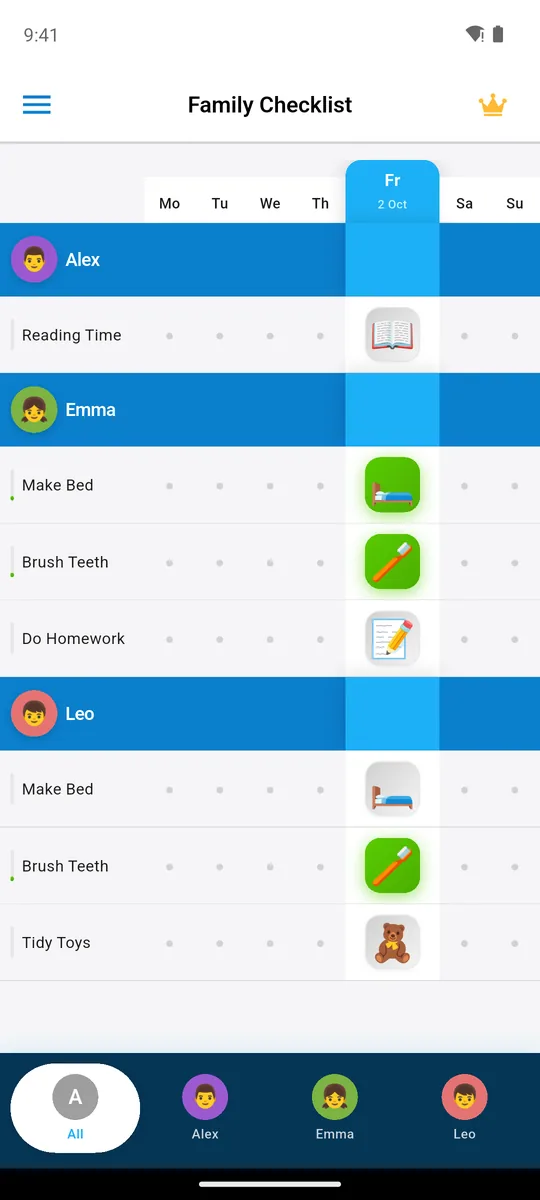
parent and two kids, one week
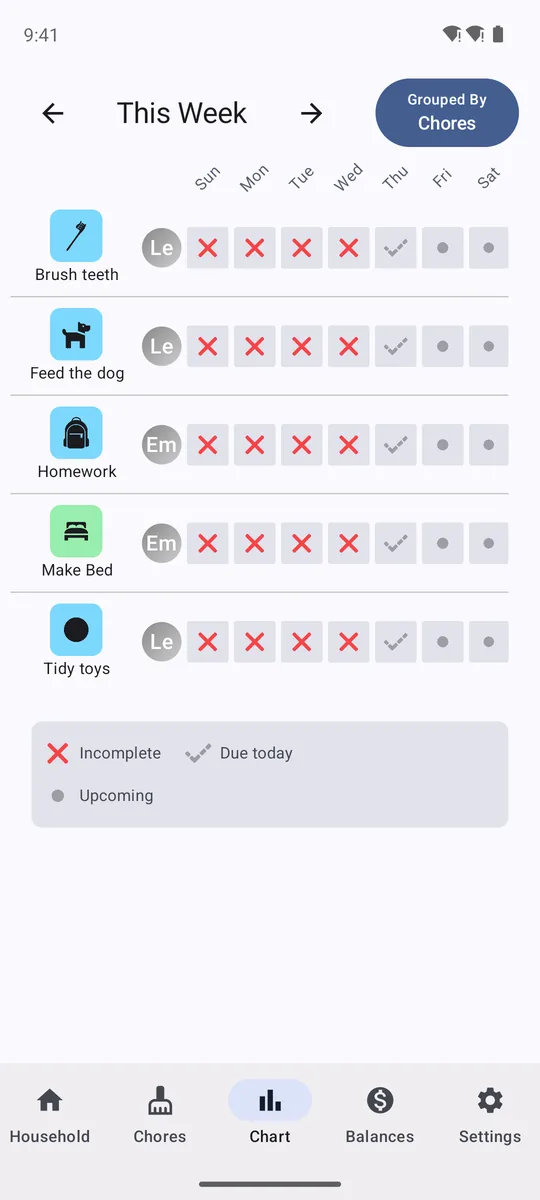
this week, grouped by chore
Family Checklist puts every family member on one week board, parents included. Its App Store page calls it perfect for kids 6 to 14 and says it works for the whole household. It also covers co-parenting: the same chart synced across both homes. Setting up that sync across devices is part of Premium; the shared chart on one phone is free.
Chorsee also has a household chart, and its week view can be grouped by chore or by person. Joon is the opposite case: it is built for kids, and parents approve tasks rather than take part. For the deep dive, see Chorsee vs Neat Kid, one family, one week.
Checklist or Game: What Each App Shows Your Child
This is the biggest choice, so make it before you install anything. Some kids need a game to care. Others are happy to tick a box and see a star, and a game would only add screen time.
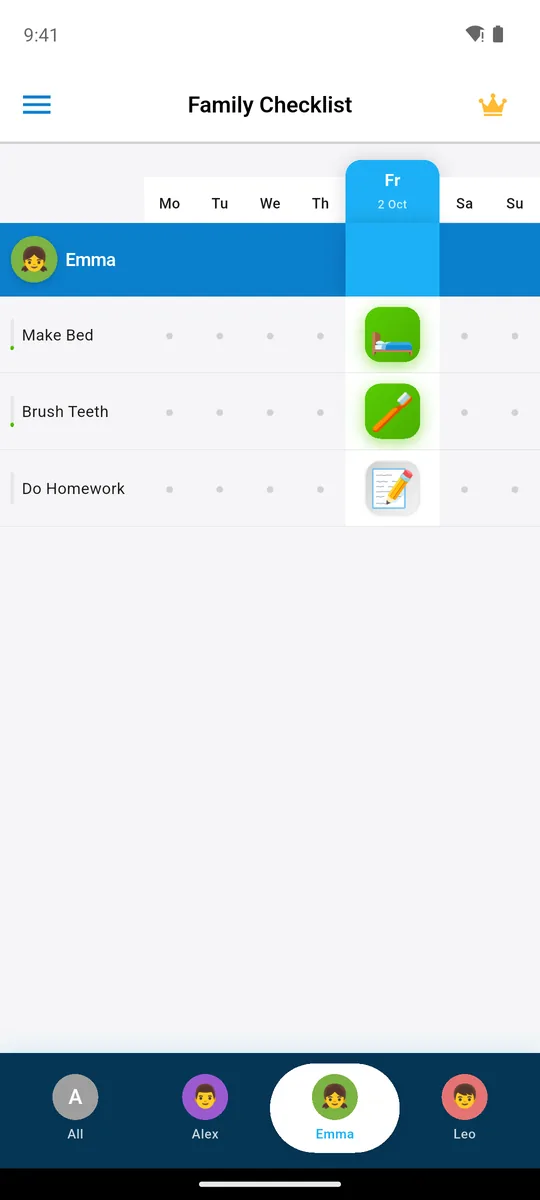
Emma's three tasks for today
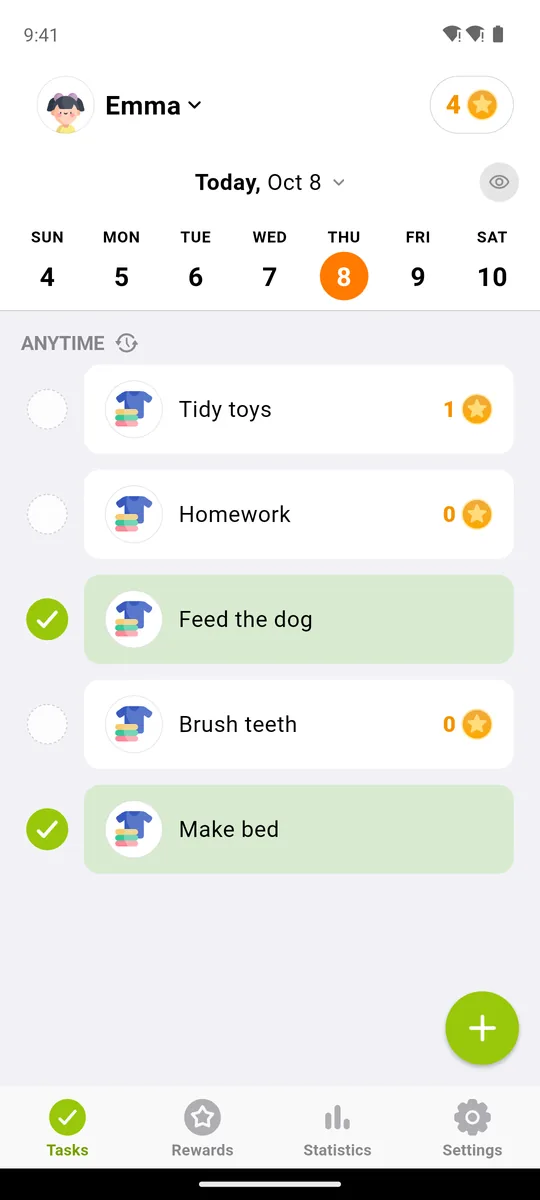
Emma's tasks with stars
In Family Checklist the child sees their own row: three tasks with big icons, tapped green when done. There is no game, no coins and no shop on the child's screen. The store page puts it plainly: "Stars and streaks, not dollars and cents." Neat Kid also keeps it simple: a list of tasks with stars. Custom rewards sit in its Premium plan.
Joon goes the other way. The child plays a pet video game. When a parent approves a finished task, the child gets coins to care for the pet and open new parts of the game. If your child will only do tasks for a game, that can work where a checklist can't. It also means the routine now lives on a game screen. We look at that trade-off in our Joon review: $89.99 a year and the pet game. Habitica is the grown-up version of the same idea: tasks earn gold, experience and items in a role-playing game.
If chores turn into daily meltdowns, or you suspect ADHD, no app will fix that on its own. Your pediatrician is the right first call; an app or chart can support the plan they suggest.
Not sure which kind of kid you have? If your child already follows a paper chart, even for a few days at a time, a checklist will likely do. Our guide on how to motivate kids to do chores has more ideas that don't need an app at all.
Try it free: one weekly chart for the whole family, and this week's chart prints for the fridge.


A Chore Chart for the Fridge, Printed Free
Here is a thing a phone can't do: hang on the fridge at a 7-year-old's eye level.
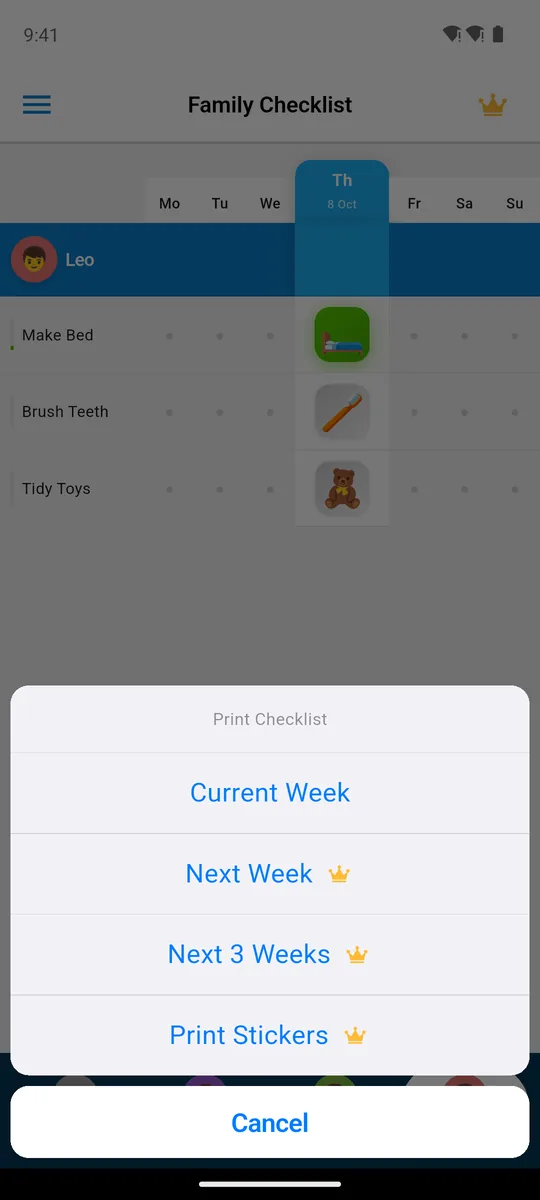
Current Week prints free
Family Checklist turns this week's chart into a PDF you can print on the free version. Printing next week, the next three weeks or stickers needs Premium. None of the other six apps mentions a printable chore chart in its store listing.
If you only want paper, you don't need an app at all. Build your own in the Chore Chart Maker, and our guide to making a chore chart last the school year shows what to put on it. Our comparison of an app vs a printable chore chart explains when each one wins.
What a Chore App Costs in a Year
Most comparison pages give a price with no billing period, or no price at all. Here is what twelve months costs, straight from the US App Store listings on October 12, 2026.
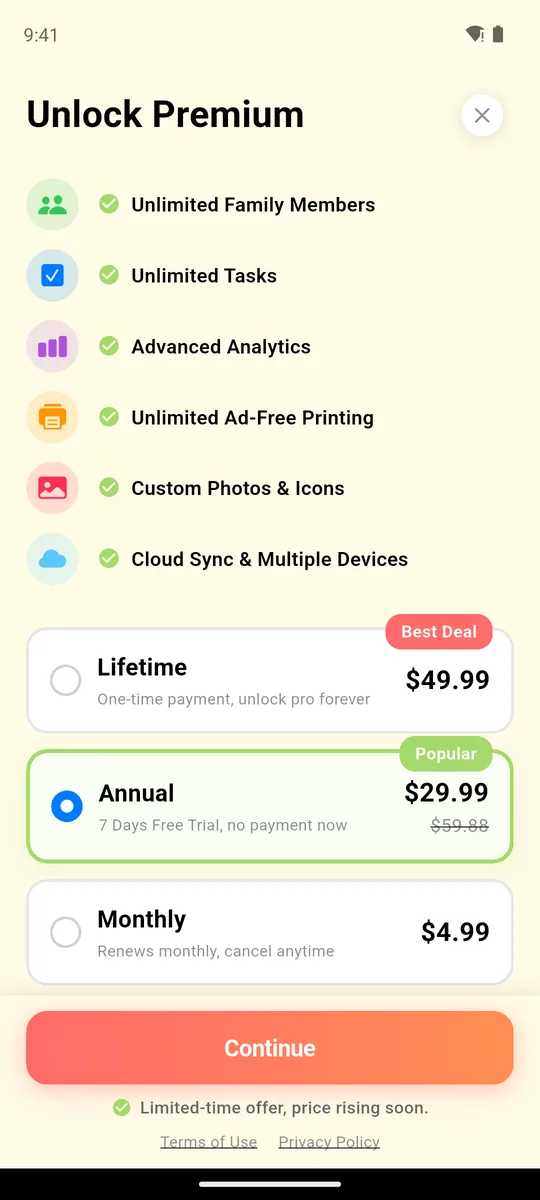
$29.99 a year or $49.99 once
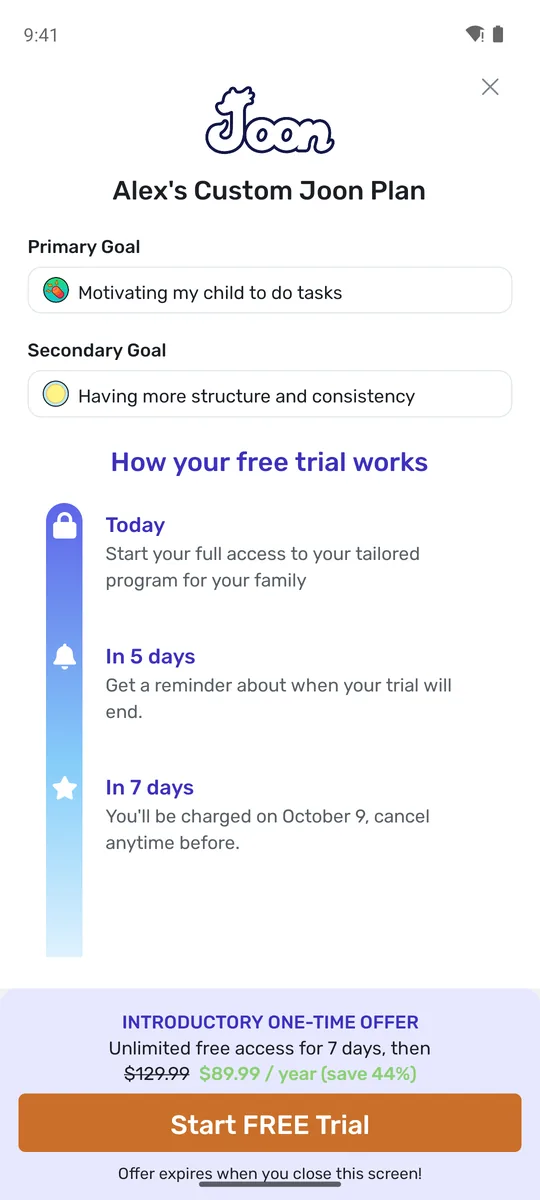
$89.99 a year after 7 days
Swipe the table sideways →
| App | 12 months | Other options |
|---|---|---|
| Family Checklist | $29.99 a year (7-day free trial) | $49.99 once; $4.99 a month |
| Habitica | Free | Optional: $4.99 a month up to $47.99 a year |
| MyChoreBoard | Free | None stated |
| Chorsee | $39.99 or $89.99 a year | $119.99 or $224.99 once; $8.99 a month |
| S'moresUp | $79.99 a year | $7.99 a month |
| Joon | From $89.99 a year | $12.99 a month |
| Neat Kid | See the store | Prices from $4.99 to $79.99, plans not named |
Of the apps whose store listing names a yearly plan, Family Checklist has the lowest stated yearly price: $29.99 a year, or $49.99 once with no renewals. Its 7-day free trial comes with the yearly plan only. Habitica and MyChoreBoard cost nothing, so on price alone they win. Chorsee lists two yearly and two one-time prices, and the store doesn't say which one applies to whom. Joon showed us its yearly price on its first screen, with a trial and a note that the offer ends when you close it.
Before you pay for anything, run the free version for a couple of weeks and see if the chart sticks. For a closer look at where each free version stops, see what stays free in four chore apps.
Getting Started: Account or No Account
A chore app you have to fight with on a Sunday night won't last. The first screen tells you a lot.
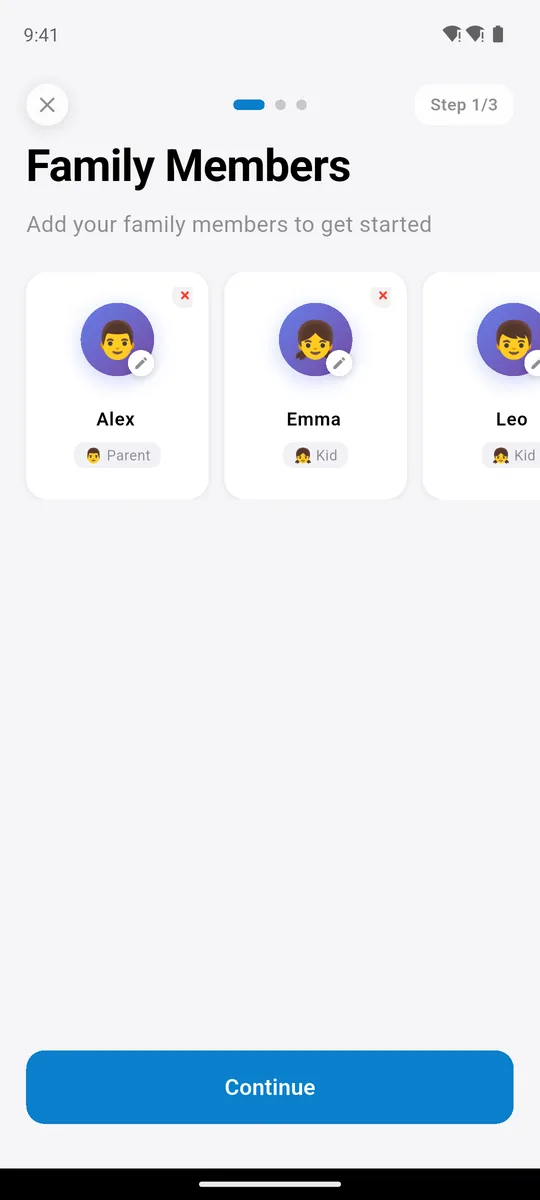
step 1: family members
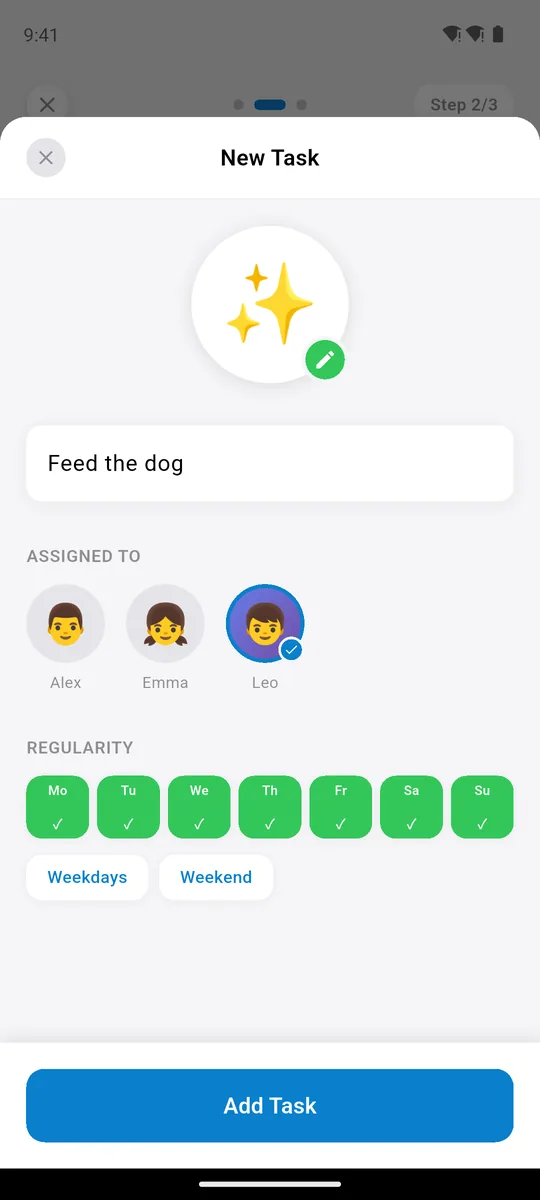
step 2: a task and its days
Family Checklist opens on "Family Members, Step 1 of 3", with no sign-up. You add names, pick tasks from 150+ built-in chores with icons or write your own, and choose the days. The app comes in 15 interface languages. Joon needs an account before you start. Chorsee lets you in as a guest. Neat Kid on Android starts with a Google sign-in.
Several kids on one phone
In Family Checklist, each family member has a tab at the bottom of the screen. Tap a child's name and the chart shows only their tasks, which makes one shared phone or tablet workable. Syncing the chart to a second device is part of Premium. Neat Kid is free for the first child, and more children need Premium. Chorsee's free account stops at 10 chores; one Plus subscription covers the family, since its paywall says family members get Plus for free. Our list of age-appropriate chores from 2 to 14 helps you pick the first tasks.
The Other Chore Apps, in Short
Joon: a pet game for kids 6 to 12
The child does a task, the parent approves it, and the child earns coins for a pet video game. It runs on iOS, Android, Amazon Fire tablets and Chromebooks, and it has a 4.68 rating from 6,561 ratings on the US App Store. There is a free version that families can use indefinitely, with limited features. The Joon website gives $12.99 a month or from $89.99 a year. The App Store listing shows ten different "All Access" prices. Pick it if a game is the only thing that gets your child moving.
Chorsee: chores, rotation and allowance for a busy household
Chorsee has chore rotation, photo proof, widgets and allowance tracking, and Family Checklist has none of these. It holds 4.58 stars from 11,866 ratings on the App Store and 4.43 from 149 on Google Play. A free account covers 10 chores. Chorsee Plus adds unlimited chores, allowance tracking, chore notes and subtasks, and photo proof, and its paywall says family members get Plus for free. Prices: $8.99 a month, $39.99 or $89.99 a year, or $119.99 or $224.99 once.
Neat Kid: stars and rewards for one child
Neat Kid is free for your first child. Its Premium plan adds unlimited tasks, more children, custom rewards, photo proof and priority support. It is available in 31 languages. It has 4.73 stars from 930 ratings on the App Store, and 4.41 from 1,578 on Google Play, with more than 100,000 installs. On the US App Store it lists prices from $4.99 to $79.99 but doesn't say which plan each one is, so check there first.
Habitica: a free role-playing game for teens
Habitica can be "fully enjoyed for free", in the words of its App Store listing. When you do something in real life, you check it off and earn gold, experience and items for the game. Optional subscriptions run from $4.99 a month to $47.99 a year. It has 4.30 stars from 3,498 ratings on iOS and 4.66 from 75,818 on Google Play. It suits a teen who already likes role-playing games better than it suits a 7-year-old.
S'moresUp: a family organizer with a 45-day free window
S'moresUp adds a family calendar, penalties and reports for busy homes with several kids. The catch is in its App Store listing: the free version gives you 45 days of Premium. After that, it is $7.99 a month or $79.99 a year. It has 4.20 stars from 896 ratings on iOS and 3.05 from 1,037 on Google Play, and its last iOS update was October 23, 2025.
MyChoreBoard: free, on the web and on Fire tablets
MyChoreBoard says it is free for families and "built to stay that way". It runs on the web, iPhone, iPad, Android and Amazon Fire. The rating is high, 4.87, but from only 77 ratings. The site doesn't say how many kids or chores the free board holds. We didn't test it in the app.
Cozi and routine timers
If your real problem is the family calendar, Cozi is the veteran, with 400,801 ratings on the US App Store. It is a calendar with lists, not a chore chart, and its paid Cozi Gold plans run from $29.99 to $59.99 in the store. Happy Kids Timer is a countdown timer for morning and bedtime routines, last updated in April 2023. Pair a timer with any of the apps above if mornings are the battle; our morning routine for kids lays out the steps by age.
Chore Apps for Teens, and Apps That Pay Kids
Teens, 13 to 17. Stated age ranges matter here. For 13- and 14-year-olds, Family Checklist still fits: its store page describes it for kids 6 to 14. A shared chart with the parents' tasks next to theirs also feels less like being managed. Joon stops at 12, and Neat Kid's listings disagree: 5 to 9 in one, 5 to 18 in another. If you want a free chore app for teens of 15 and up, Habitica is the honest pick. It is fully free and pays out gold, experience and items for real-life tasks. For the bigger picture of what kids can take on as they grow, see our life skills checklist by age.
Paying kids. If you want each chore to earn money, Family Checklist is the wrong tool: it does stars and streaks, never dollars. Chorsee is the chore-first app that also pays, through allowance tracking in Chorsee Plus. Greenlight, BusyKid and similar apps are built around money from the start. Whether to pay at all is its own debate, and we lay out both sides in should you pay kids for chores.
When Another App Is the Better Pick
We'd rather you pick the right app than ours. If your child will only do tasks for a game, Joon's pet game motivates in a way a checklist can't. If you need chore rotation, photo proof, widgets or allowance tracking, choose Chorsee: Family Checklist has none of these. If you want custom rewards, photo proof or one of 31 languages, look at Neat Kid. If your teen loves role-playing games and you want to pay nothing, Habitica is fully free. And if your problem is the calendar rather than the chores, Cozi is built for that. If none of those describe your family, and you want one calm week chart for everyone, start with Family Checklist.
Key Takeaways
- Decide game or checklist first. Joon and Habitica are games; Family Checklist, Chorsee and Neat Kid are lists.
- Check where the free version stops: 3 people × 3 tasks (Family Checklist), 10 chores (Chorsee), one child (Neat Kid), 45 days (S'moresUp).
- Family Checklist puts parents and kids on one week chart, and its store page describes it for ages 6 to 14.
- Lowest stated yearly price among apps that name their plans: Family Checklist, $29.99 a year or $49.99 once. Habitica and MyChoreBoard are free.
- Pick Chorsee for rotation, photo proof and allowance, Joon for a game, Habitica for a teen.
Frequently Asked Questions
What is the best chore app for kids?
It depends on your child. For one weekly chart the whole family shares, free for 3 people × 3 tasks, pick Family Checklist (our app). If only a game gets your child moving, Joon fits better, for ages 6 to 12. For a teen who likes role-playing games, Habitica is free.
What is the best free chore app?
Habitica and MyChoreBoard are fully free, while Family Checklist, Chorsee and Neat Kid have free versions that stop at a set limit. For exactly where each one stops, see what stays free in four chore apps.
Is there a chore app that pays kids?
Yes. Chorsee Plus includes allowance tracking, and money apps such as Greenlight and BusyKid are built around paying kids. Family Checklist uses stars and streaks and has no money features.
Is there a chore app for teens?
Family Checklist is described for kids 6 to 14, so it still covers 13- and 14-year-olds. Joon stops at 12. For older teens, Habitica is a free chore app that turns tasks into a role-playing game with gold, experience and items.
Which chore app has points and rewards?
Joon gives coins for a pet video game after a parent approves a task. Chorsee has points. Neat Kid has stars, and custom rewards are in its Premium plan. Family Checklist has stars and streaks.
How much does a chore app cost?
On the US App Store in October 2026, Family Checklist costs $29.99 a year or $49.99 once, and Joon from $89.99 a year. Chorsee costs $39.99 or $89.99 a year, and S'moresUp $79.99 a year. Habitica and MyChoreBoard are free. Neat Kid lists prices from $4.99 without saying which plan each one is.
Related Reading
- Joon App Review (2026): $89.99 a Year, Worth It for ADHD?
- Chorsee vs Neat Kid vs Family Checklist: Review (2026)
- Free Chore App: What Stays Free in 4 Kids' Apps (2026)
- Family Routine App vs. Printable Chore Chart: Which Works Better?
- Harvard's 85-Year Study on Kids and Chores
- How Long Does It Take to Form a Habit? 66 Days, Not 21
Try Family Checklist free
One weekly chart for everyone, parents included, free to start. This week's chart prints free for the fridge.