Homey App Review (2026): Chores, Allowance, Price, Free Plan
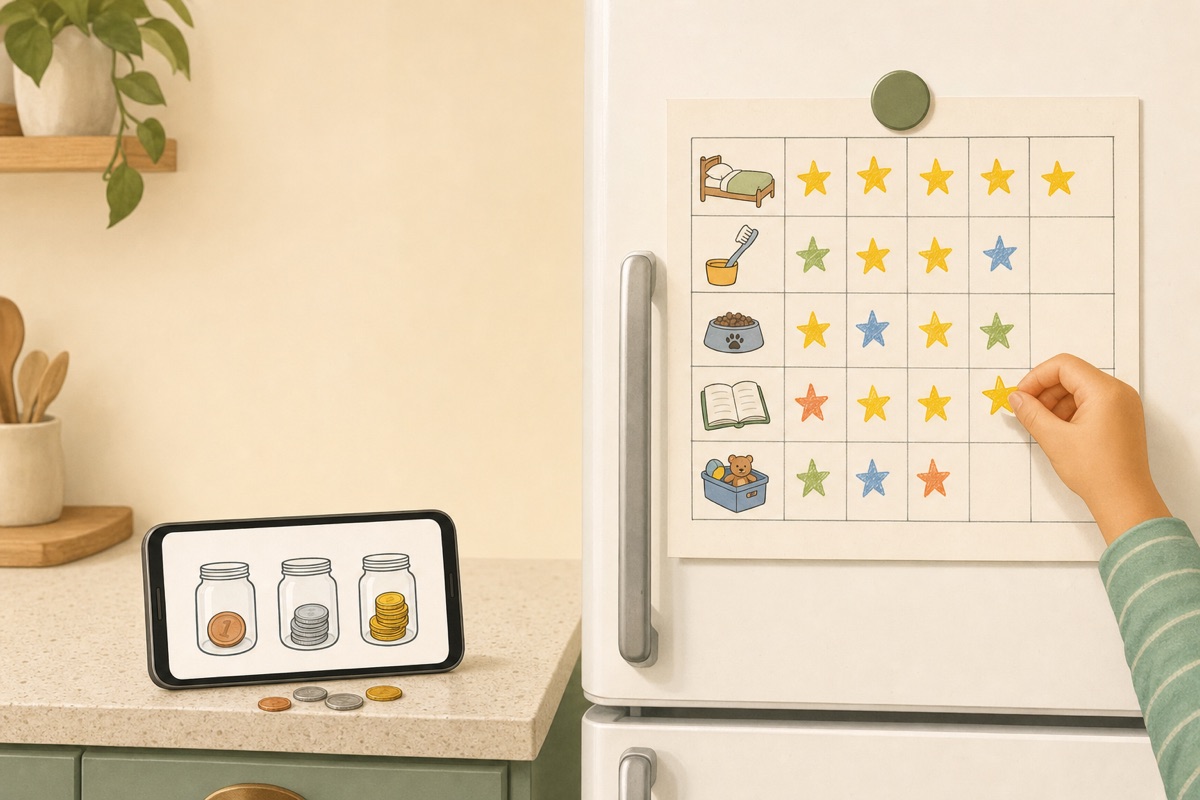
This Homey app review is about Homey – Chores and Allowance by HomeyLabs, the kids' chore and money app, not the Homey smart-home hub that shares its name. Homey pays kids for chores: jobs earn money, a weekly allowance arrives when the daily chores are done, and savings go into jars. If that is what you want, Homey does it and Family Checklist does not. If you want chores to become a habit without putting a price on each one, Family Checklist is simpler and cheaper: the whole family on one weekly chart.
How we tested. On October 19, 2026 we installed Homey from Google Play on an Android emulator and set up our usual pretend family: a parent, Alex, and two kids, Emma and Leo. We stayed on the free plan and bought nothing. US prices come from the US App Store and Google Play, checked October 19 and again October 22 (our test account is in Portugal, so the in-app paywall showed euros, which we don't quote). We also read 665 written Homey reviews from both US stores. Family Checklist is our app; it has no US ratings yet, and where Homey does something better, we say so.
The short answer
- Family Checklist if you want chores to become a habit without paying per chore: one week chart for the whole family, parents included, free for three family members with three tasks each, no time limit. If you outgrow it, $29.99 a year or $49.99 once.
- Homey if you want to pay per chore and teach money with it: paid jobs, a weekly allowance, savings jars and, in the US, transfers to a child's bank account. Free for three accounts, and the parent counts as one; then $6.99 a month or $59.99 a year on the US App Store.
- Not sure about money yet? Read should you pay kids for chores first; it decides which kind of app you need.
What the Homey App Does: Chores Plus Allowance
Homey, by HomeyLabs Inc, has been on the App Store since December 2015. Its listing calls it “The perfect app to teach your kids about money through completing chores and working towards goals.” The Homey homepage puts it even more plainly: “Connecting Chores with Allowance teaches kids that money is earned and not simply given.” The whole app is built around that idea.
Chores come in two kinds. Responsibilities are the everyday ones you won't pay for; jobs are extra work that earns money or rewards. The allowance sits on top: the Homey manual says “In Homey you can set up allowance that pays out weekly, but only when and if all the Responsibilities have been done,” and a Strictness slider sets the percentage that counts as done. On our test phone, Emma's wallet showed an allowance of $3.00 per week.
“Saving goals in Homey are called Jars,” says the manual; once a jar is full, you pay it out in cash or buy the thing it was for. Emma's free account showed three jars, Save, Spend and Donate. Homey also has a reward that isn't money: a daily goal that gives a privilege when today's responsibilities are done. Ours read “30 minutes of tablet time.”
- Photo proof and approval. A chore can ask for a picture, and some need a parent's confirmation before money is added.
- Wallet up and down. Reduce and Boost buttons; the manual compares deducting for misbehaving to a “swear jar.”
- Bank transfer, US only. With a subscription, allowance can go straight to a child's savings account.
- Reminders, chat and reports. Notifications when chores are due or done, a family Chat tab, and a weekly count per child.
The latest update, on January 29, 2026, added the “Homey Heroes,” five cartoon companions; on our phone they appeared on the paywall and chore packs, while chore screens kept plain broom tiles. Homey runs on iPhone and iPad, Android and the Amazon Appstore. Homey's site offers no web or Windows version, and the App Store lists English only.
One thing to say plainly before the comparison: Family Checklist has none of the money side. No allowance, no jars, no wallet, no payouts. Kids earn stars and streaks; any other reward is up to you, and our 10 ways to motivate kids to do chores has ideas that don't involve money. That choice decides between the two apps more than any feature.
Homey App vs Family Checklist at a Glance
Homey's limits are from our free test account. On the US App Store, Homey has 4.1 stars from 2,777 ratings; on Google Play it has 2.7 stars from 684 reviews and 100,000+ downloads. Family Checklist is new and has no US ratings yet.
Swipe the table sideways →
| Oct 2026 | Family Checklist | Homey |
|---|---|---|
| Free plan | 3 family members × 3 tasks, no time limit | 3 accounts, the parent included; no time limit stated |
| Yearly price (US) | $29.99, 7-day trial | $59.99 (App Store); $49.99 (Play listing) |
| Monthly price (US) | $4.99 | $6.99 (App Store); $4.99 (Play listing) |
| One-time purchase | $49.99, yours for good | Not on the paywall we saw (1 or 12 months) |
| Whole family on one view | One week chart, parents too | A card per child, today's chores; works best with a device each |
| Printable fridge chart | Current week, per the print menu | Not mentioned on Homey's pages |
| Ready-made tasks | 150+ with icons, plus your own | Your own, plus chore packs; some free, some sold |
| Languages | 15 in the app | English (App Store listing) |
| Money: allowance, jobs, jars | None, by design | Yes, plus US bank transfer (paid) |
| Reminders | None | Yes |
| Photo proof | None | Yes |
| Last update | October 2, 2026 | January 29, 2026 |
US prices from the US App Store and Google Play, before tax. Homey's Play price is the figure in its listing text and in its in-app terms on Android.
Homey App Cost and What the Free Plan Covers
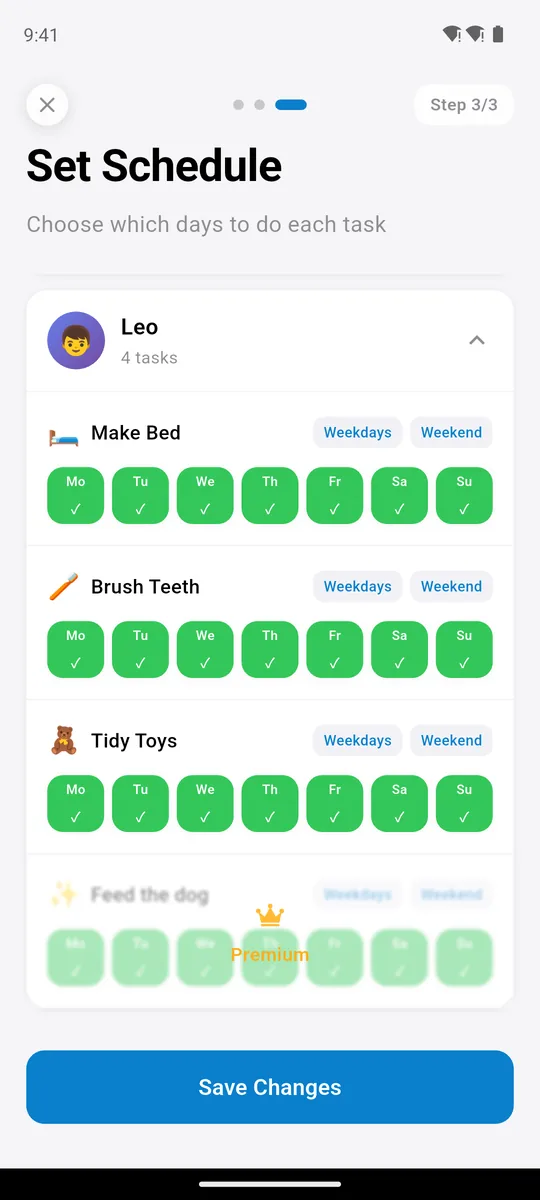
3 tasks each, free for good
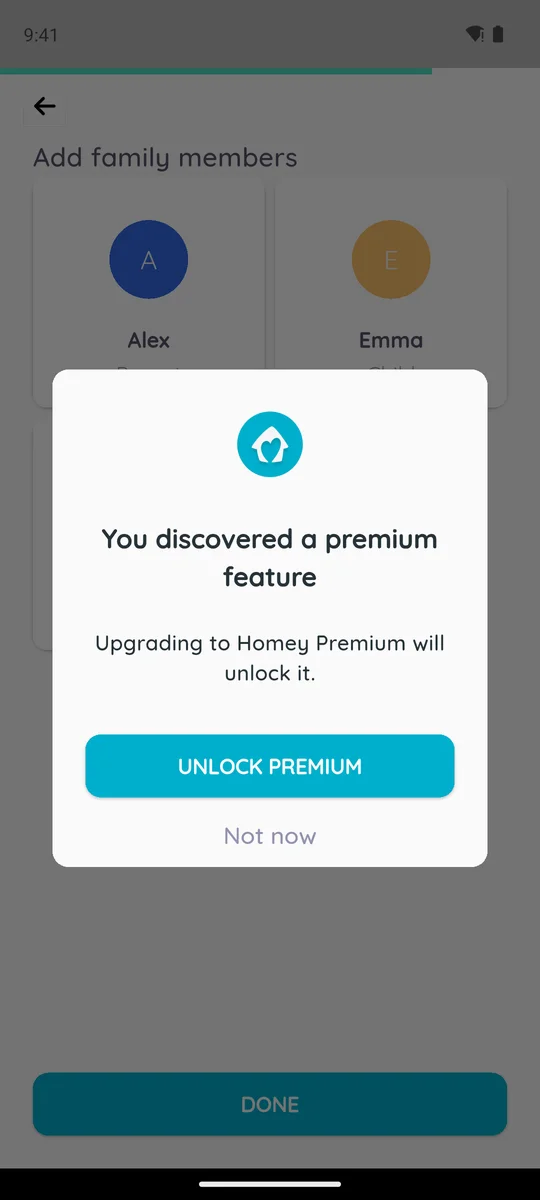
a 4th account asks for Premium
Homey's FAQ says basic chores, allowance and rewards are “available completely for free for families that will use up to three accounts.” What most write-ups leave out is that the parent is one of the three. A Google Play reviewer found that out at the start:
“3 user limit includes parent. I thought I could evaluate it on the free plan but I have 3 kids & the parent counts as a user. So I can't even try it out.”
— Google Play review, December 30, 2025, 2★
Our test matched. Alex, Emma and Leo filled the three accounts, and adding a fourth family member brought up “You discovered a premium feature.” So free Homey is one parent and two kids; a second parent or a third child needs a subscription. Some chore settings and wallet actions also asked for Premium on our free account. Homey lists more family members, more jars, bank transfers, adding or deducting money and custom permissions among the paid features.
Family Checklist's free plan has the same headcount and a different shape: three family members, kids or adults, three tasks each, no time limit. A fourth task shows a Premium crown. Free covers three people, for example you and two kids. A second parent, or the chart synced to another phone, is Premium.
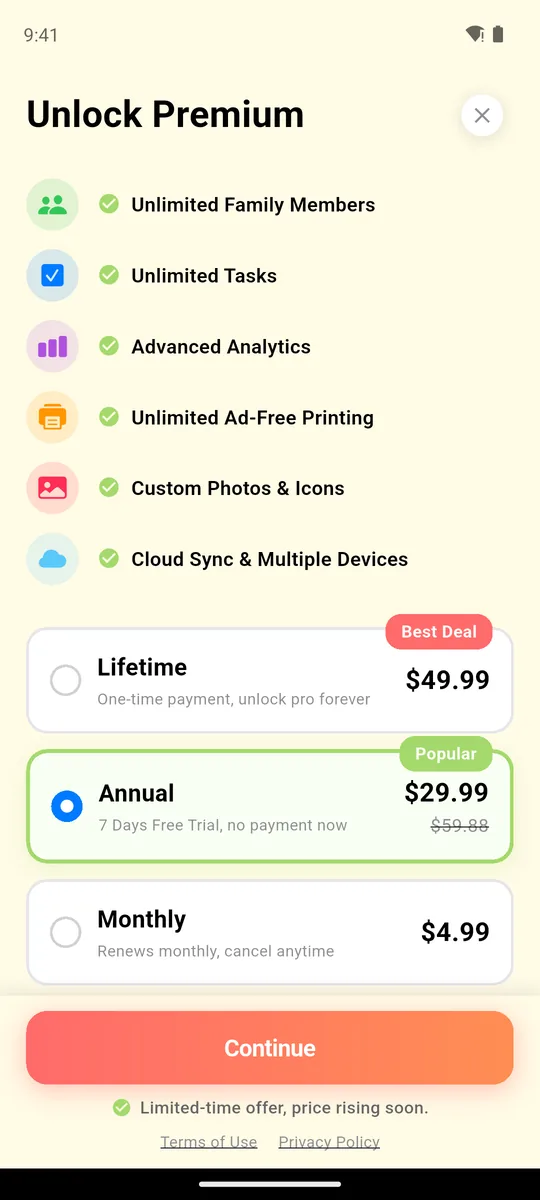
$29.99/yr or $49.99 once
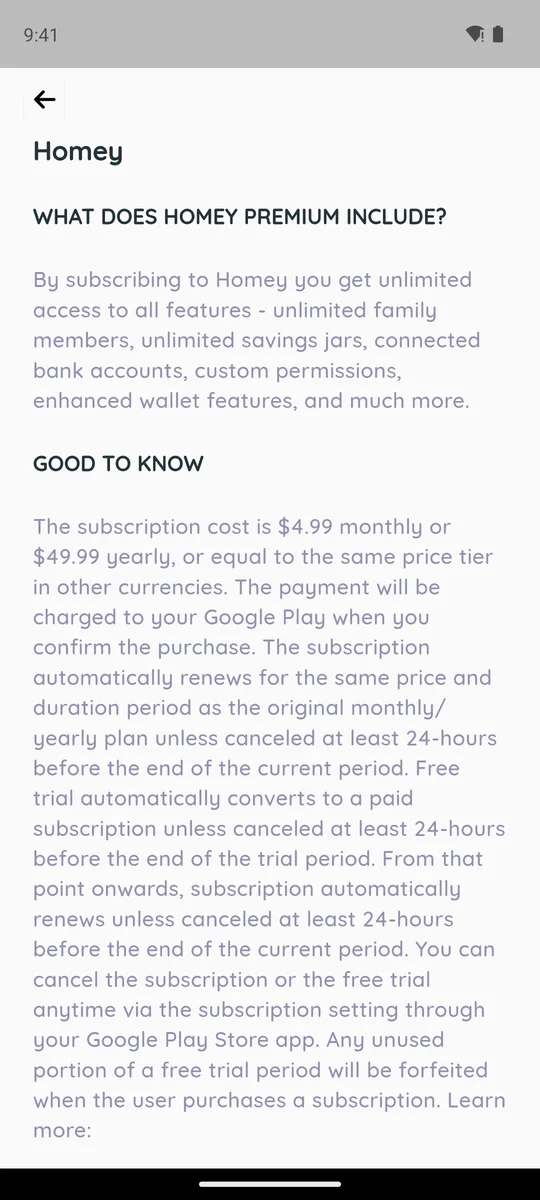
in-app terms: $4.99/mo or $49.99/yr
Try the no-money option: the whole family on one week chart.


Homey's price depends on where you look. The US App Store lists Homey Monthly at $6.99 and Homey Yearly at $59.99. Its Google Play listing says “You can subscribe on a month-to-month ($4.99) or yearly ($49.99) basis,” and the terms inside the app on our Android phone said the same. Older reviews such as Common Sense Media's (last updated in 2019) give the same $4.99 and $49.99.
Over twelve months: Homey $59.99 (App Store) or $49.99 (Google Play); Family Checklist $29.99, or $49.99 once and never again.
Watch the trial. The manual says “All the paid plans have 7 days of free trial,” and the store adds that the trial “automatically converts to a paid subscription unless canceled at least 24-hours before the end of the trial period.” On our paywall, only the 12-month plan showed the trial. Two Google Play reviewers in 2026 say they were charged after a trial and refused a refund:
“I went for a trial and got charged over $50. They told me I am not eligible for a refund.”
— Google Play review, April 30, 2026, 1★
“I got what I thought to be a trial. Then charged $54.98”
— Google Play review, June 24, 2026, 1★
To stop a Homey trial before it renews, cancel it in the store you subscribed through (App Store, Google Play or Amazon) at least 24 hours before the trial ends; a phone reminder for day six helps. Family Checklist's 7-day trial is on the annual plan only; the monthly and one-time plans have none.
Homey on One Shared Tablet vs a Family Week Chart
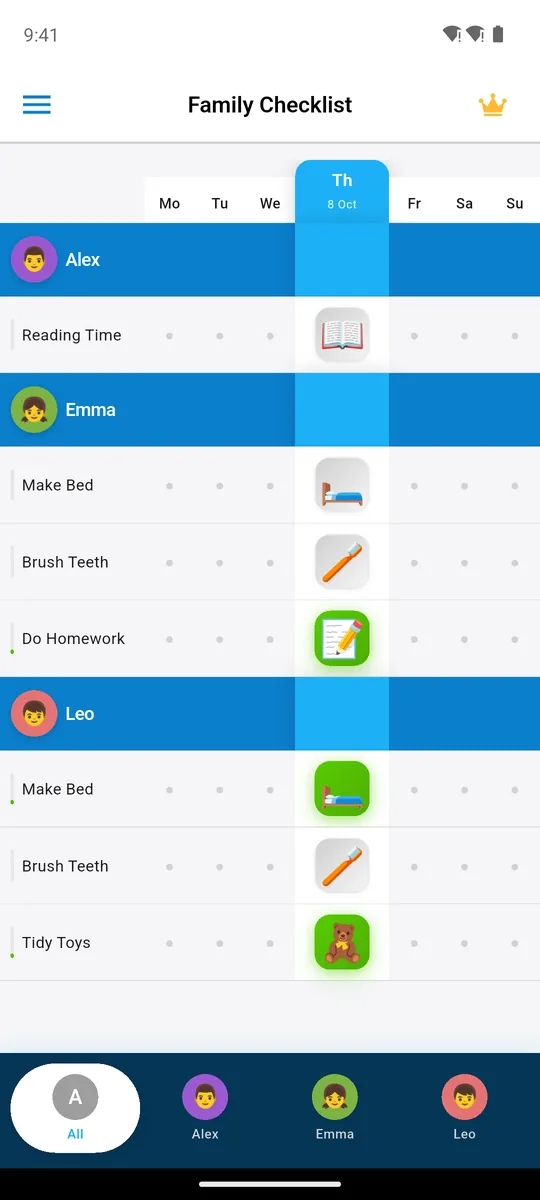
everyone's week, parents too
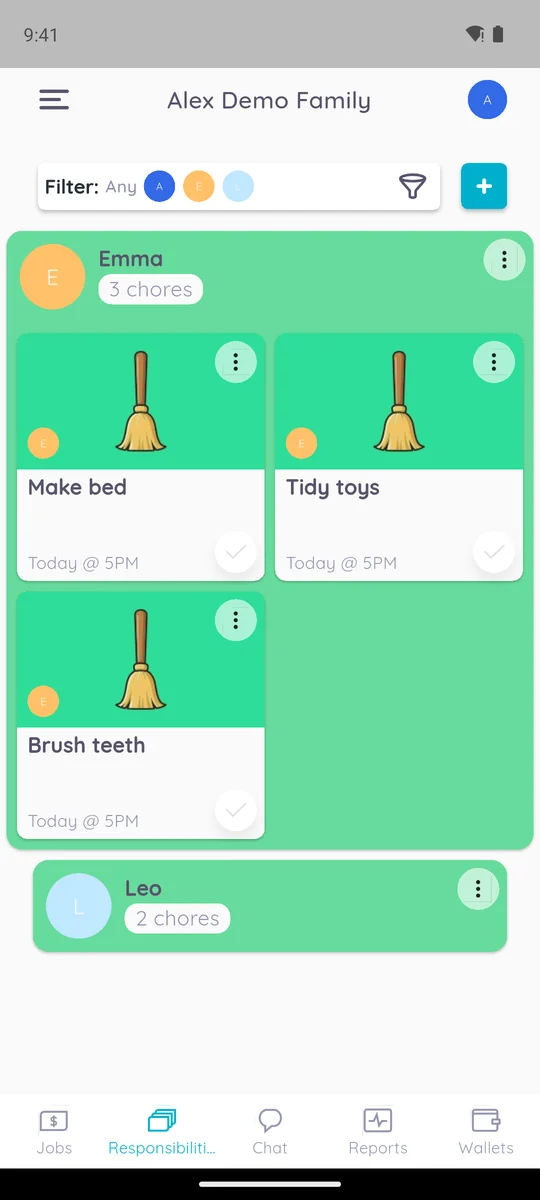
a card per child, today's chores
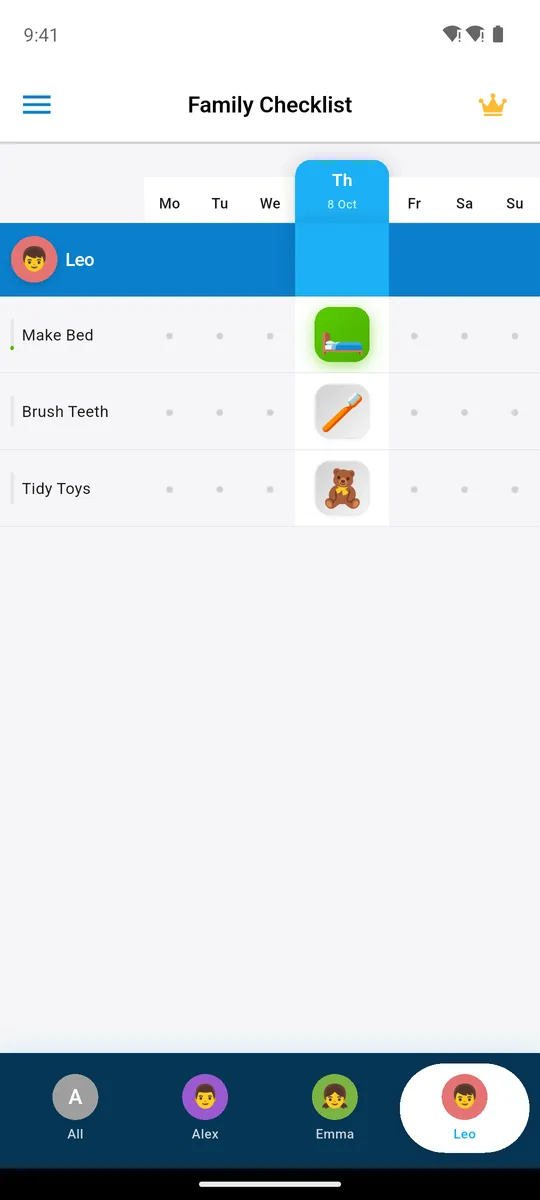
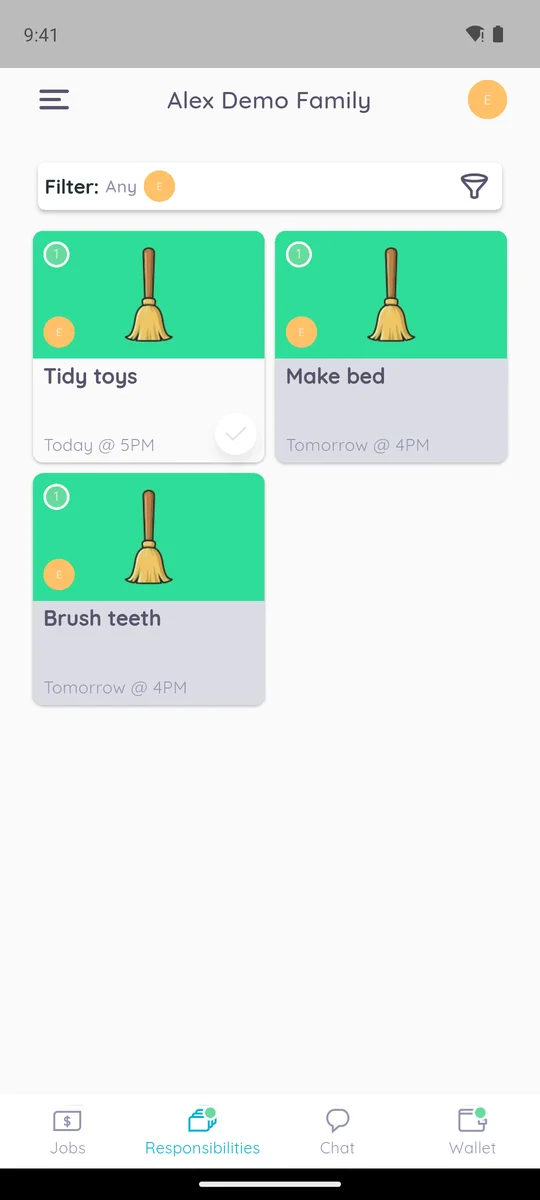
Family Checklist opens on the whole family's week: who made their bed on Monday, who still has homework on Thursday, and your own tasks, since parents are on the chart too. Homey's parent screen shows one card per child with today's chores as tiles, each with a due time like “Today @ 5PM.” Alex, the parent, has no card.
Homey works best with one phone per person. Its FAQ says it “works best when each of the family members has their own device (so that they can get reminders), you can also switch accounts easily.” Families with younger kids and one shared tablet tell a different story; eight reviewers in our sample describe trouble switching profiles. One wrote:
“This app only works if each person has a device. We wanted to set this up like a command center, but you can’t switch between profiles easily.”
— App Store review, May 30, 2024, 2★
Family Checklist works like that command center by default: the week chart sits on one phone or tablet, each child taps their name to see their tasks, and the fridge copy covers the rest. If your 6-year-old has no phone, that matters more than any feature list.
Setting Up Homey: Chores, Jobs and Chore Packs
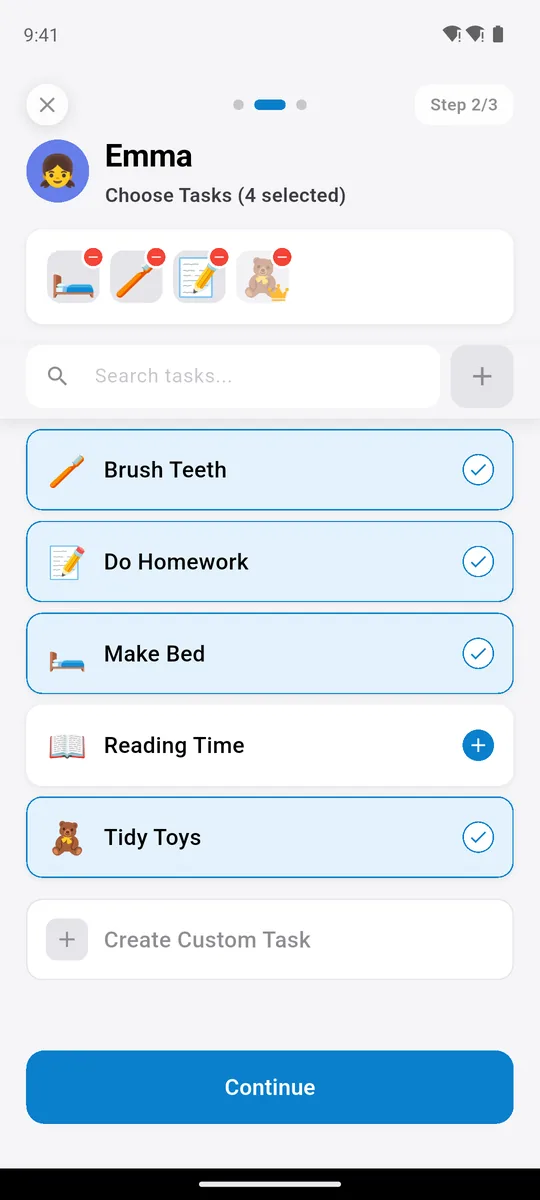
built-in task list with icons
chore packs, some sold
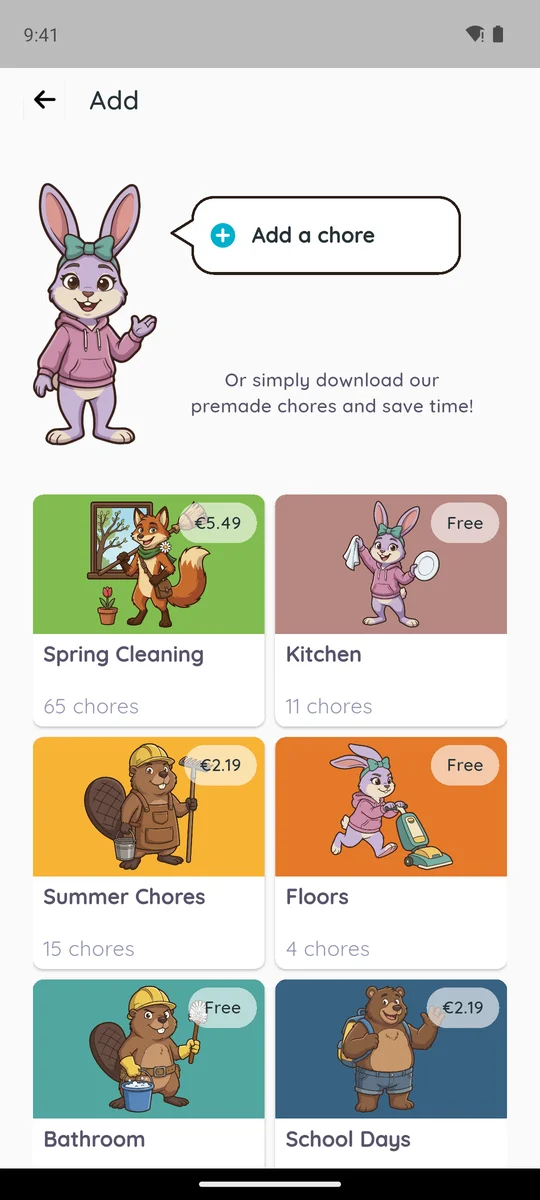
Family Checklist comes with more than 150 age-appropriate tasks with kid-friendly icons, and you can add your own, like “Feed the dog.” Type the names, tick tasks from the list, pick the days. You can even photograph a paper checklist and the app turns it into tasks. In Homey, after setting up a shared family password and a personal one, you add each chore yourself or download a pack. Kitchen (11 chores), Floors and Bathroom were free in our test; the US App Store sells Spring Cleaning for $4.99 and Before & After School for $1.99.
Homey has more settings per chore, such as recurrence, due time and photo proof, on top of the split between paid jobs and unpaid responsibilities. That is power if you want it and homework if you don't. A 4-star reviewer in 2024 called it “Tricky to learn at first”, and a 2-star review from December 2024 is titled “Too Complicated”. Not sure which chores fit your child's age? Our age-appropriate chores list covers ages 2 to 14, and chores for 8-year-olds goes deeper on one age.
What Kids See in Homey (and the Wallet Tab)
Leo's tab: his week
Emma's chores for today
Here the apps are close. Homey shows Emma her chores with a check button, plus Jobs, Chat and Wallet tabs. Family Checklist shows Leo his week; he ticks tasks and earns stars and streaks. The difference is the Wallet tab: in Homey, money is one tap from every chore, which is the point if you are teaching money.
Can You Print a Homey Chore Chart?
print this week free
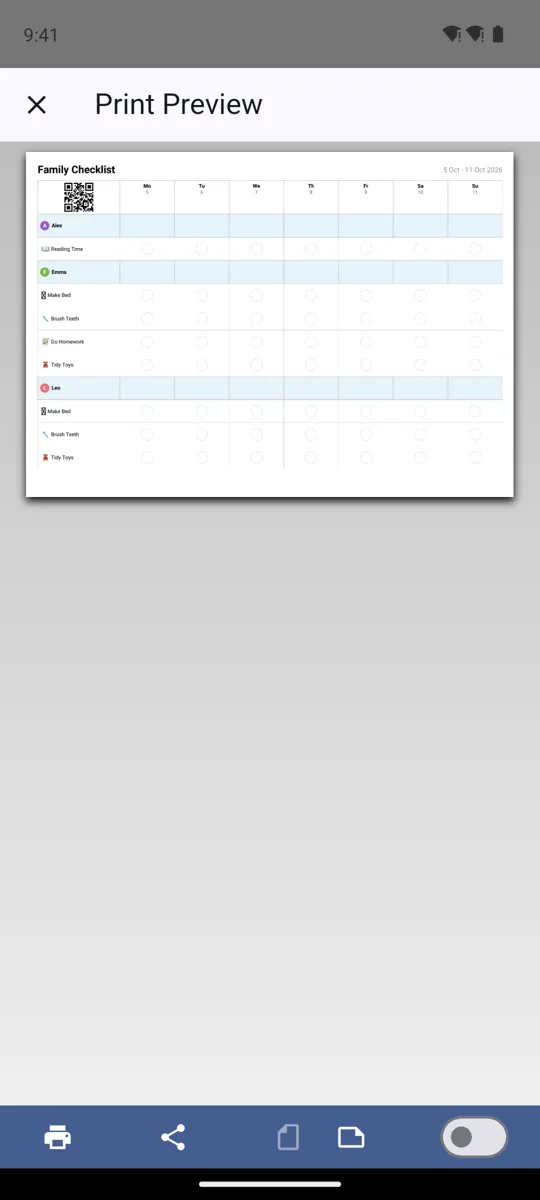
the weekly chart as a PDF
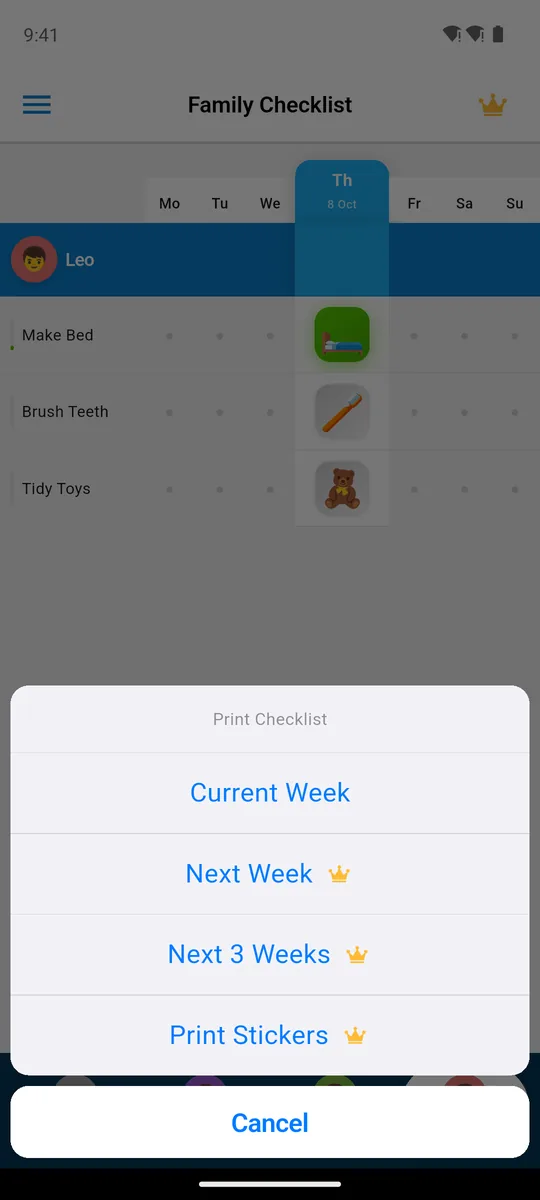
Homey's FAQ says the app is for families “dissatisfied with using paper charts and sticky notes on their fridge.” Family Checklist goes the other way and keeps the fridge: it prints the family's week as a PDF, and the print menu shows the current week free; next weeks and stickers are Premium. We found nothing about printing on Homey's pages. If paper is all you need, see our guide to making a chore chart work during the school year or app vs printable chore chart.
What Parents Say About Homey, 2024 to 2026
The fans are real. About two dozen of Homey's 4- and 5-star reviews praise the earning, the allowance or the jars, and parents whose kids want to earn sound happiest:
“Our kids are older and are motivated by earning extra money, so this is the perfect system to monitor it all.”
— Google Play review, December 4, 2024, 5★
A caution: unhappy users write more reviews. Homey averages 4.1 stars on the US App Store, yet 191 of the 306 written App Store reviews we read give 1 or 2 stars. Still, the recent ones are worth reading. Of the 665 reviews we read, 95 date from 2024 or later, and 49 of those report a bug, a crash or not being able to get in. Sixteen could not create a family, log in or open the app at all; one 2025 reviewer got “Homey Server Error – Error 400” on every attempt. In 2026, five reviewers describe recurring chores “expiring”:
“Everyday, every single chore that my kids don’t do, the chores ‘expire’ and I have to go in to every chore every day and manually reset it.”
— App Store review, August 7, 2026, 1★
Seven reviewers since 2024 say support never answered. One of them, from August 2026, praised one thing and cancelled over another:
“I appreciate that kids can have separate jars for spending, saving, and donating.”
— App Store review, August 11, 2026, 2★
“I reached out to customer support hoping this could be fixed, but never got a response, so I ended up canceling our membership.”
— the same review
None of this means it won't work for your family. A 5-star reviewer back in 2019 called it “the first app that got my kids doing chores consistently, and without me nagging.” It does mean the free plan is the place to find out, before paying for a year.
Should a Chore App Pay Your Kids?
That is the real question behind the choice, and research and parents both split on it. Many families land in the middle: a baseline of unpaid chores because everyone lives in the house, plus a small allowance or paid extras to practice money. Homey is built for the paid half, Family Checklist for the unpaid half; for the pros, cons and research, read should you pay kids for chores.
When Homey Is the Better Pick
If you have decided to pay for chores, Homey is the better pick. It ties jobs, a weekly allowance and jars together, can deduct for misbehaving, can ask for photo proof and parent approval, sends reminders, and in the US can move money to a child's bank account. Family Checklist has no money, no reminders, no photo proof and no penalties, and it won't pretend to. Homey also suits families where each child has their own phone, and older kids who are already motivated by earning. Just know the free plan counts the parent and recent reviews report bugs.
If what you want is chores done because everyone lives in the house, Family Checklist is the better fit: one weekly chart with parents on it, a paper copy for the fridge, and a free plan with no time limit. For other options, our best chore apps for kids roundup covers seven apps, the Joon app review covers the game-style choice, Chorsee vs Neat Kid compares two more charts, and free chore app shows what stays free in each.
Key Takeaways
- Homey is a chores-and-allowance app by HomeyLabs, not the smart-home hub: paid jobs, weekly allowance, jars and US bank transfer.
- Homey's free plan covers three accounts, the parent included, so one parent and two kids.
- Homey costs $6.99 a month or $59.99 a year on the US App Store; its Google Play listing says $4.99 or $49.99. The trial converts automatically.
- Family Checklist has no money; it puts the whole family on one week chart, free for three family members with three tasks each and no time limit.
- If you outgrow it, Family Checklist is $29.99 a year or $49.99 once.
Frequently Asked Questions
Is the Homey app the same as the Homey smart home app?
No. Homey – Chores and Allowance is a family chore and money app by HomeyLabs Inc. The smart-home Homey is a hub app from a different company.
How much does the Homey app cost?
On October 22, 2026 the US App Store lists Homey Monthly at $6.99 and Homey Yearly at $59.99; the Google Play listing says $4.99 a month or $49.99 a year. Paid plans start with a 7-day trial that renews automatically unless cancelled at least 24 hours before it ends.
Is the Homey chore app free?
Partly. Homey says basic chores, allowance and rewards are free for families using up to three accounts. The parent is one of the three, so the free plan covers one parent and two children; in our test, adding a fourth member asked for Premium.
What are jars in the Homey app?
Jars are savings goals. A child's money goes into a jar, and when it is full the parent pays it out in cash or buys the item it was for. Our free test account showed three jars per child: Save, Spend and Donate.
Does Homey work on one shared tablet?
It can switch accounts, but Homey says it works best when each family member has their own device, and some reviewers with a shared iPad report trouble switching profiles.
Is there a Homey app alternative that doesn't pay kids?
Family Checklist puts every family member's weekly chores on one chart with stars and streaks and no money. Homey itself also has a non-money option: a daily goal that gives a privilege, such as tablet time, when the day's chores are done. Our best chore apps for kids roundup compares more apps.
Related Reading
- Best Chore Apps for Kids 2026: 7 Apps Compared Honestly
- Should You Pay Kids for Chores? The Pros, Cons & What the Research Actually Says
- Free Chore App: What Stays Free in 4 Kids' Apps (2026)
- Joon App Review (2026): $89.99 a Year, Worth It for ADHD?
- Chorsee vs Neat Kid vs Family Checklist: Review (2026)
- How to Motivate Kids to Do Chores: 10 Ways Beyond Money
Try Family Checklist free
Three family members, three tasks each, free with no time limit. One week chart for the whole family.
Homey is a trademark of HomeyLabs Inc. Family Checklist is not affiliated with HomeyLabs.